Resend vs SendGrid (2026): Which Email API Is Better?
Introduction
If you're choosing a transactional email API in 2026, the resend vs sendgrid decision keeps coming up — and for good reason. Both handle sending emails at scale, but they're aimed at very different users with different priorities.
This article cuts through the marketing copy. You'll get a direct breakdown of pricing, developer experience, deliverability, and features — with real numbers, not vague promises. Whether you're a solo indie hacker, a SaaS founder, or an engineering team migrating off an existing provider, this comparison gives you what you need to decide.
What this article covers
Pricing tables, API design, deliverability mechanics, setup time, and a clear recommendation based on your use case.
Who should read this
Developers, indie hackers, and SaaS founders building with Next.js, React, or any modern stack who send transactional or marketing email programmatically.
TL;DR — Quick Comparison Table
| Feature | Resend | SendGrid |
|---|---|---|
| Starting price | $0 (free tier) | $19.95/month (after 60-day trial) |
| Free tier | 3,000 emails/month, 100/day | No free tier — 60-day trial only (as of May 2025) |
| Best for | Developers, modern stacks, Next.js apps | High-volume senders, enterprise teams, legacy migrations |
| API design | Clean REST, developer-first | Mature REST, feature-rich but verbose |
| React Email support | Native — built by the same team | Community packages only |
| Deliverability | Strong on shared IPs; dedicated IP on enterprise | Strong; dedicated IP available at $30/month |
| Setup time | ~8 minutes | ~45 minutes |
| Marketing email | Broadcasts (beta) | Campaigns (fully featured) |
What is Resend?

Overview & Background
Resend launched in 2023 as a developer-first email API. It was built by the team behind React Email, an open-source component library for building emails with React. That shared origin is the clearest signal of what Resend is optimizing for: a modern, code-first experience where email fits naturally into your existing component workflow.
Resend is a smaller, focused product compared to legacy platforms. It doesn't try to do everything — it tries to do the developer-facing part exceptionally well. You can explore the full Resend documentation to see just how minimal the surface area is.
Key Strengths
- Native React Email integration with first-class TypeScript support
- Minimal, predictable REST API with clear error messages
- Fast onboarding — domain verification to first sent email in under 10 minutes
- Clean dashboard with logs, webhooks, and per-email status tracking
Who It's Built For
Resend is purpose-built for developers who are shipping products, not managing email infrastructure. If your stack includes Next.js, TypeScript, or any React-based framework, and you want email to feel like any other API call, Resend fits naturally.
What is SendGrid?

Overview & Twilio Acquisition
SendGrid was founded in 2009 and spent a decade becoming one of the most widely used email platforms in the world. In 2019, Twilio acquired SendGrid for $3 billion, adding it to a communications platform that already included SMS, voice, and video APIs.
That acquisition brought resources and wider integrations — but it also brought corporate velocity. SendGrid today is a large, feature-complete product with accumulated complexity: extensive documentation, multiple pricing tiers, a drag-and-drop template editor, a dedicated marketing campaign suite, and support for sending hundreds of millions of emails per month. The full SendGrid documentation reflects that breadth.
Key Strengths
- Battle-tested infrastructure with over 15 years of deliverability optimization
- Full marketing email suite with segmentation, A/B testing, and automations
- SMTP relay support for non-API senders
- Extensive third-party integrations (Zapier, HubSpot, Salesforce, etc.)
- Dedicated IP options with established warmup tooling
Who It's Built For
SendGrid is built for teams with scale and complexity requirements — high-volume senders, enterprise marketing teams, or companies that need a single platform for both transactional and marketing email with deep CRM integrations. Also see our Mailgun vs SendGrid comparison if you're evaluating multiple providers at once.
Developer Experience & API Design
Resend API & React Email Integration
Resend's API is deliberately minimal. Sending an email looks like this:
import { Resend } from 'resend'; import { WelcomeEmail } from './emails/welcome'; const resend = new Resend(process.env.RESEND_API_KEY); await resend.emails.send({ from: 'hello@yourdomain.com', to: 'user@example.com', subject: 'Welcome aboard', react: <WelcomeEmail name="Alex" />, });
The react prop is what makes this genuinely different. You pass a React component directly — no serialization step, no separate template system, no context-switching. React Email handles the rendering to HTML behind the scenes. See the Resend API reference for the full list of supported parameters.
React Email crossed 1.35 million weekly npm downloads in February 2026, which signals broad adoption beyond just Resend users. But when you use React Email with Resend, the integration is seamless — same team, same conventions.

SendGrid API & SDK Overview
SendGrid's API is mature and well-documented. It supports both SMTP and REST, which matters for teams migrating from legacy systems that already use SMTP relay. The Node.js SDK is actively maintained and covers the full API surface — the SendGrid Node.js SDK is a good starting point.
The tradeoff is verbosity. SendGrid's API reflects years of added features — dynamic template IDs, personalizations arrays, category tracking, and suppression group IDs can make a straightforward transactional send feel heavyweight. It's all there for good reason at scale, but it's more surface area to learn upfront.
Setup Time & Documentation Quality
Resend's own benchmark: ~8 minutes from signup to first sent email. That includes domain verification via DNS records, generating an API key, and making your first API call. The Resend quickstart guide is short, current, and example-driven.
SendGrid's setup is more involved — closer to 45 minutes when you account for domain authentication (SPF, DKIM, DMARC), sender identity verification, and navigating the settings dashboard before your first send. We've covered the full process in our SendGrid setup guide if you want a step-by-step walkthrough.

Next.js & TypeScript Support
Both providers have TypeScript SDKs. Resend's types are tight and the SDK is written in TypeScript natively. SendGrid's Node.js SDK has TypeScript definitions, but the types can feel looser in places.
For Next.js specifically, Resend works cleanly in both App Router and Pages Router API routes. React Email components render server-side without configuration. This is an email API for developers who want zero friction in a modern stack.
Verdict: Resend wins on developer experience — lower setup friction, native React Email support, and a cleaner API for modern TypeScript stacks. SendGrid wins if you need SMTP relay or are integrating with legacy systems.
Pricing Comparison
Resend Pricing Plans
| Plan | Price | Emails/month | Key limit |
|---|---|---|---|
| Free | $0 | 3,000 | 100 emails/day |
| Pro | $20/month | 50,000 | — |
| Scale | $90/month | 100,000 | — |
| Enterprise | Custom | Custom | Dedicated IP included |
Resend's pricing is straightforward. The free tier is genuinely useful for development and low-volume production use — 3,000 emails/month with a 100/day cap. The Pro plan at $20/month is a reasonable entry point for early-stage products. Scale at $90/month covers most growing SaaS apps without needing enterprise negotiation. Full details on the Resend pricing page.
SendGrid Pricing Plans
| Plan | Price | Emails/month | Key limit |
|---|---|---|---|
| Trial | $0 (60 days) | 100/day during trial | Trial expires |
| Essentials | $19.95/month | 50,000 | No dedicated IP |
| Pro | $89.95/month | 100,000 | Dedicated IP available |
| Premier | Custom | Custom | Advanced support |
SendGrid discontinued its free plan in May 2025. What exists now is a 60-day free trial — after which you're on a paid plan. The Essentials plan starts at $19.95/month but does not include a dedicated IP. Dedicated IP access requires the Pro tier or above. You can verify current figures on the SendGrid pricing page.

Free Tier Comparison
This is a significant differentiator in 2026. Resend offers a permanent free tier with 3,000 emails/month. SendGrid's free tier no longer exists — the 60-day trial is time-limited, and what you get during that window is 100 emails/day, which isn't enough to properly test deliverability at real send volumes.
For indie hackers and early-stage founders, this alone may be the deciding factor. If you're also considering Amazon SES as a low-cost option, our Amazon SES vs SendGrid comparison breaks down how SES stacks up on pricing and deliverability.
Cost Per Email at Different Volumes
| Monthly Volume | Resend | SendGrid |
|---|---|---|
| 1,000 emails | $0 (free tier) | $19.95 (Essentials) |
| 10,000 emails | $0 (free tier) | $19.95 (Essentials) |
| 50,000 emails | $20 (Pro) | $19.95 (Essentials) |
| 100,000 emails | $90 (Scale) | $89.95 (Pro) |
| 500,000 emails | Custom | Custom |
At low-to-mid volume, Resend is clearly cheaper — or free. At 50K and 100K sends/month, pricing is roughly equivalent between the two platforms. The real difference at those volumes is features and deliverability infrastructure, not cost.

Dedicated IP Add-On Costs
- Resend: Dedicated IP is available on enterprise plans. No self-serve dedicated IP option on standard plans. See Resend enterprise for details.
- SendGrid: Dedicated IP costs $30/month, available starting at the Pro plan. SendGrid requires a minimum of 500+ daily sends to justify a dedicated IP — below that volume, a shared IP pool from a reputable sender actually performs better. Full setup is covered in our SendGrid setup guide.
Who wins on pricing? Resend — especially for developers under 50K sends/month. The permanent free tier and lower barrier to entry make it the cheaper option until you hit high volume. At scale, pricing converges.
Deliverability
How Deliverability Works (SPF, DKIM, DMARC)
Before comparing platforms, it helps to understand what actually determines whether your email lands in the inbox. Three DNS-based authentication standards do the heavy lifting:
- SPF (Sender Policy Framework): Declares which mail servers are authorized to send on behalf of your domain.
- DKIM (DomainKeys Identified Mail): Cryptographically signs outgoing email so receiving servers can verify it wasn't tampered with.
- DMARC (Domain-based Message Authentication, Reporting & Conformance): Ties SPF and DKIM together and tells receiving servers what to do when checks fail (reject, quarantine, or do nothing).
All three are required for strong inbox placement in 2026. Both Resend and SendGrid walk you through the SPF DKIM DMARC setup during onboarding — Resend's domain verification docs and SendGrid's domain authentication guide both cover this step-by-step.

Resend Deliverability — Shared vs Dedicated IP
Resend sends from shared IP pools that are actively managed and monitored. For most senders under enterprise volume, shared IPs perform well — especially if your list hygiene is good and your domain reputation is clean.
Dedicated IPs on Resend are reserved for enterprise-tier customers. This is a limitation if you want a dedicated IP at mid-tier send volumes. That said, a dedicated IP isn't always the right call — a brand-new IP with no warm-up history can perform worse than a healthy shared pool.
SendGrid Deliverability & Dedicated IP
SendGrid has spent 15+ years building and defending its IP reputation. Its shared IP pools benefit from that history. The $30/month dedicated IP on SendGrid is available at the Pro tier, with built-in IP warmup tools that help you ramp sends gradually to build a positive sending history. SendGrid's IP warmup documentation covers the recommended ramp-up schedule.
For high-volume senders — say, above 200K emails/month — having a dedicated IP that is fully within your control becomes increasingly important. SendGrid's tooling here is mature. For a real-world view of how SendGrid performs under load, see our SendGrid Review 2026.

Spam Rate & Inbox Placement
Transactional email deliverability is largely a function of sender reputation, list hygiene, and authentication — not which platform you're on. Both Resend and SendGrid have strong shared IP reputations.
The practical difference in email spam rate between the two platforms is small for well-maintained senders. Where SendGrid has an edge is at high volume and for senders who need dedicated infrastructure with warmup tooling built in. Where Resend has an edge is in keeping you from misconfiguring your authentication setup in the first place — the onboarding flow is harder to mess up.
Who wins on deliverability? It's a draw for most use cases. SendGrid has a deeper feature set for dedicated IP management at high volume. Resend's streamlined setup means fewer authentication errors out of the gate.
Features Comparison
Email Templates & Editor
Resend leans entirely on React Email for templating. There's no drag-and-drop editor. If you're comfortable with React components, this is a superpower — you get full programmatic control, version control, and component reusability. Browse the React Email component library to see what's available out of the box. If you need non-technical team members to edit templates, it's a blocker.
SendGrid offers a drag-and-drop Design Editor, a code editor, and dynamic template support with Handlebars syntax. Non-developers can update copy and layouts without touching code. See the SendGrid Dynamic Templates docs for details. For teams where marketing owns email content, this matters.

Webhooks & Analytics
Both platforms support webhooks for email events (delivered, opened, clicked, bounced, complained). Resend's webhook documentation shows a clean, straightforward setup. SendGrid's Event Webhook is more configurable and supports batching and retry logic — useful at high event volume.
Analytics follow a similar pattern: Resend gives you clean, per-email logs; SendGrid gives you aggregate stats, category filtering, and more granular reporting options.

Marketing Email (Broadcasts vs Campaigns)
Resend Broadcasts is a marketing email feature currently in beta. It allows sending to subscriber lists from the same platform — useful for founders who don't want to manage a separate tool for newsletters or announcements. See the Resend Broadcasts overview for what's currently supported.
SendGrid Campaigns is a fully mature marketing email product with A/B testing, list segmentation, automation, and unsubscribe management. If marketing email volume and sophistication is a core requirement, SendGrid is ahead. For a head-to-head on transactional vs marketing email infrastructure, our Mailgun vs SendGrid comparison covers similar trade-offs in depth.
SMTP Support
Resend supports SMTP relay in addition to its REST API — see Resend SMTP docs for credentials and configuration. SendGrid also supports SMTP and has done so since its founding — it's deeply integrated into legacy systems, CMS platforms, and marketing tools via SMTP credentials. The full SendGrid SMTP guide covers both manual and app-level setup.
If you're migrating from a system that uses SMTP and can't switch to a REST API, both will work — but SendGrid's SMTP implementation has more depth and longer-standing third-party compatibility.
When to Choose Resend vs SendGrid
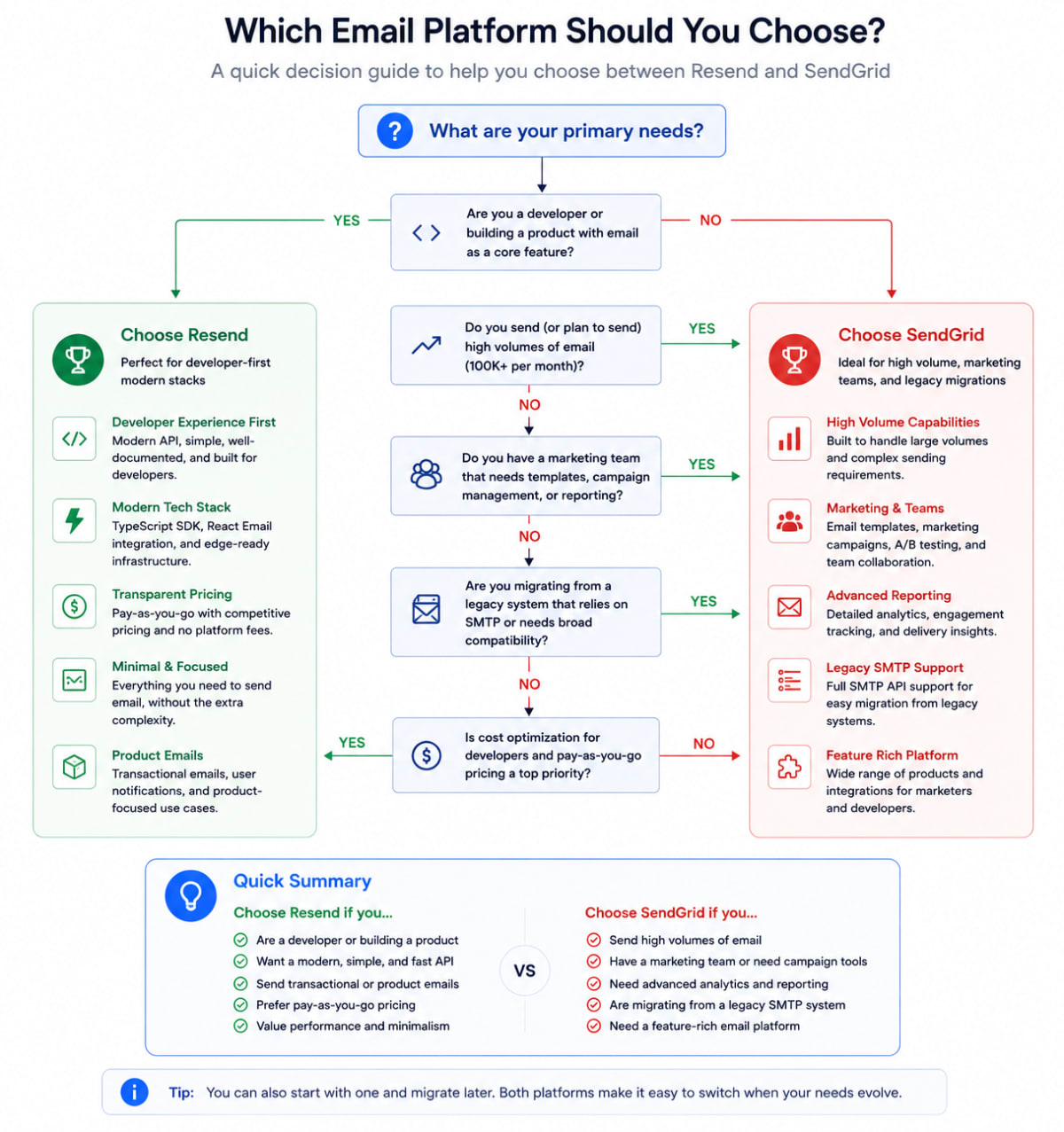
Choose Resend if…
- You're building with Next.js, React, or a TypeScript-first stack
- You want to get email working in under 10 minutes
- You're under 50K sends/month and want a free or low-cost tier
- You use React Email for templating and want native integration
- You're an indie hacker or early-stage SaaS founder who values simplicity over feature depth
- You don't need non-technical team members editing email templates
Choose SendGrid if…
- You're sending at high volume (200K+ emails/month) and need dedicated IP infrastructure with warmup tooling
- You need a mature marketing email suite alongside transactional sends
- Your team includes non-technical stakeholders who need a drag-and-drop editor
- You're integrating with CRM tools, Zapier, HubSpot, or other platforms that have native SendGrid connectors
- You're migrating from a legacy system using SMTP relay
- You need the full breadth of sendgrid transactional email api features including suppression groups, categories, and advanced event tracking
Looking at other providers too? Our Amazon SES vs SendGrid comparison is worth reading if cost-per-email at high volume is your primary constraint.
Conclusion
The resend vs sendgrid decision in 2026 is less of a coin flip than it used to be. The two products have diverged in target audience:
Resend is the right call for the majority of developers reading this. If you're building a SaaS product, a Next.js app, or any modern web project and you send fewer than 100,000 emails per month, Resend gives you better developer experience, a permanent free tier, and native React Email integration — with no meaningful deliverability trade-off.
SendGrid remains the stronger choice if you're operating at scale, need enterprise-grade dedicated IP management, or run a team where marketing owns email campaigns through a visual editor.
Start with Resend. Migrate to SendGrid — or stay — when your volume and team complexity genuinely require it.
For a broader view of how SendGrid holds up under scrutiny, our SendGrid Review 2026 covers tested pricing, real deliverability data, and a few gotchas worth knowing before you commit.