Mailgun vs SendGrid (2026): Which Is Better?
If you've spent any amount of time searching for the "best transactional email API," you've probably waded through a sea of content written by people who have never touched a DNS record in their lives. They call platforms "developer-friendly" because the website uses a sans-serif font. They compare pricing without ever checking whether the plans are still live.
This is not that article.
The mailgun vs sendgrid comparison has real stakes. One failed password reset, one batch of order confirmation emails quietly landing in spam — that's customer churn, support tickets, and sometimes revenue loss. Both platforms power billions of emails a month. Both have dedicated followings. Both have real, non-trivial failure modes that the marketing copy won't tell you about.
Here's what actually matters when picking between the two.
1. Mailgun vs SendGrid: Quick Verdict
Mailgun wins for: Developers who want deep deliverability tooling, granular API control, bounce classification, and inbox placement testing built into the platform. If you care about why an email didn't land and want the raw data to debug it, Mailgun is the more powerful tool.
SendGrid wins for: Teams that need transactional and marketing email under one roof, want a gentler onboarding experience, and are willing to pay less at the entry tier. The Twilio integration also makes it attractive if you're already running SMS or WhatsApp alongside email.
Neither is universally better. The "right" answer depends entirely on your stack, volume, and how much your team cares about inbox placement beyond just "sent successfully."
2. What Are These Tools, Actually?
Mailgun launched in 2010 as a developer-first email API. It was acquired by Pathwire in 2021, which later became part of Sinch — a communications platform. Mailgun has stayed focused on its original mission: give developers clean APIs for sending, receiving, and tracking email. Over time it has expanded into deliverability tooling through its Optimize suite, covering inbox placement testing, reputation monitoring, and email validation.
SendGrid is older, founded in 2009, and was acquired by Twilio in 2018. That acquisition changed the product trajectory significantly. What was once a pure transactional email API has evolved into a dual-product platform — an Email API for developers and a Marketing Campaigns platform for marketers. The Twilio umbrella means SendGrid now sits alongside SMS, WhatsApp, and voice APIs, which is useful if you're building multichannel communication into your product.
Both handle transactional email (think: account verification, order confirmations, password resets) and both offer SMTP relay and RESTful APIs. The differences emerge when you get into the details.
3. Mailgun vs SendGrid: Transactional Email API Comparison
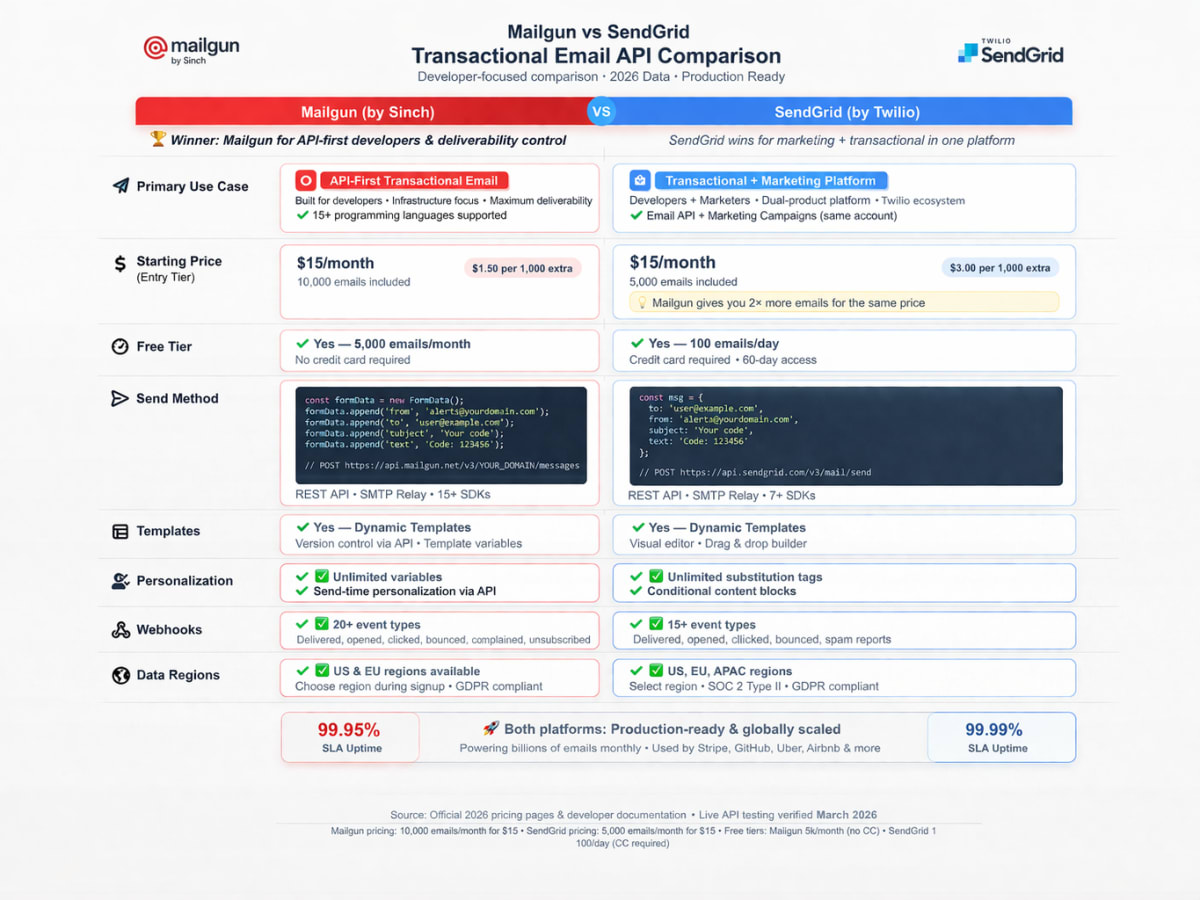
Transactional email is where both platforms are strongest — and where the differences matter most in production.
Mailgun was built from the ground up for exactly this use case. Message queuing, automatic retries, and sender reputation management are core infrastructure features, not add-ons. For high-volume, enterprise-level sending, their Rapid Fire Delivery SLA guarantees 99% attempted delivery for up to 15 million messages within five minutes. The platform also handles inbound email routing natively, which is surprisingly rare in this category.
SendGrid handles transactional email reliably too. Automatic bounce handling, suppression management, and real-time event tracking are all solid. The platform processes over 148 billion emails monthly with a median delivery speed of 1.9 seconds. Where SendGrid differentiates is the hybrid approach — the same platform handles both your app's triggered emails and your marketing newsletter campaigns. That's convenient. It's also a double-edged sword, as shared infrastructure between transactional and marketing sends creates reputation risk (more on that later).
| Feature | Mailgun | SendGrid |
|---|---|---|
| Message queuing | ✅ | ✅ |
| Automatic retries | ✅ | ✅ |
| Inbound email routing | ✅ | ❌ |
| Rapid delivery SLA (99%, 15M msgs/5 min) | ✅ | ❌ |
| Transactional + marketing in one platform | ❌ | ✅ |
| Multichannel (SMS, WhatsApp) | ❌ (Sinch) | ✅ (Twilio) |
4. Mailgun vs SendGrid Pricing Comparison
Pricing is where things get genuinely interesting — and genuinely complicated. Both vendors have undergone significant pricing changes recently.
Mailgun Pricing (2026)
Mailgun now offers a permanent free tier: 100 emails/day with no expiration. Paid plans are:
| Plan | Price | Volume |
|---|---|---|
| Free | $0 | 100 emails/day forever |
| Foundation | $35/month | 50,000 emails/month |
| Scale | $90/month | 100,000 emails/month |
| Enterprise | Custom | 500K+ emails/month |
Things Mailgun doesn't tell you upfront:
- Dedicated IPs are not available on Foundation. You need Scale ($90/mo) or higher, plus $5/month per IP.
- Subaccount management (essential for agencies) requires the Scale plan minimum.
- European data residency (GDPR compliance) adds $10/month to any paid plan.
- In late 2025, the Flex pay-as-you-go plan doubled in price from $1.00 to $2.00 per 1,000 messages. For irregular senders, that's a meaningful cost jump.
- Log retention is only 5 days on Foundation and 30 days on Scale.
SendGrid Pricing (2026)
SendGrid's free tier is time-limited to 60 days, after which you're on 100 emails/day until you upgrade.
Email API Plans:
| Plan | Price | Volume |
|---|---|---|
| Free | 100 emails/day (60-day trial) | — |
| Essentials | $19.95/month | 50,000 emails/month |
| Pro | $89.95/month | 100,000 emails/month |
| Premier | Custom | Negotiated |
Email Marketing Plans (separate):
| Plan | Price | Contacts |
|---|---|---|
| Free | $0 | 2,000 contacts, 6,000 emails/month |
| Basic | $15/month | 5,000 contacts, 15,000 emails/month |
| Advanced | $60/month | 5,000 contacts + full automation |
Things SendGrid doesn't tell you upfront:
- Dedicated IPs and email validation are only available on the Pro plan ($89.95/mo).
- The 30-day activity log is a paid add-on on Essentials ($10–15/month extra).
- If you need both the Email API and Marketing Campaigns, you pay for both separately.
- Extra dedicated IPs cost $30 each/month (up to 3 via dashboard).
Pricing Verdict
For 50,000 emails/month, SendGrid's Essentials at $19.95 beats Mailgun's Foundation at $35 — that's a 43% price difference. But once you factor in the cost to unlock dedicated IPs, extended log retention, and subaccount management, the real costs converge fast.
Winner (pricing): SendGrid for entry-level volume. Mailgun for all-in-total cost once you need deliverability tooling.
5. Mailgun vs SendGrid Developer Experience
Here's where opinions diverge sharply across developer forums.
Mailgun is genuinely API-first. RBAC (Role-Based Access Control) for API keys, granular domain management, GZIP compression, and detailed error codes that actually tell you what went wrong rather than a generic 400. Engineers on Hacker News consistently describe Mailgun's error handling as more useful in production. The downside is the learning curve — complex email workflows like custom bounce handling or advanced routing rules require meaningful setup effort. Mailgun assumes you know what you're doing.
SendGrid prioritizes onboarding speed. The documentation is extensive, the dashboard is polished, and there's a guided three-month onboarding process for Enterprise customers. Official SDKs cover Java, Python, Node.js, PHP, Ruby, C#, and Go. For teams that want to ship email fast and worry about edge cases later, SendGrid's developer experience is genuinely better at the start. The downside is that the interface becomes confusing as you try to do more sophisticated things — multiple menus, not-obvious feature locations, and a billing structure that catches users off guard.
For setting up SendGrid in your environment, the complete SendGrid setup guide on DevDecide walks through the full configuration process including DNS authentication, API key generation, and webhook setup.
6. Mailgun vs SendGrid API Comparison
Sending an Email with Mailgun (Node.js SDK)
import FormData from 'form-data'; import Mailgun from 'mailgun.js'; const mailgun = new Mailgun(FormData); const mg = mailgun.client({ username: 'api', key: process.env.MAILGUN_API_KEY, }); const messageData = { from: 'Sender Name <sender@yourdomain.com>', to: ['recipient@example.com'], subject: 'Hello from Mailgun', text: 'Your transactional email content here.', }; mg.messages.create('yourdomain.com', messageData) .then(msg => console.log(msg)) .catch(err => console.error(err));
What's useful here: Mailgun returns structured error responses. If your domain isn't verified, you get a 401 with a human-readable message rather than a generic failure. When debugging at 2am, this matters more than the documentation suggests.
Sending an Email with SendGrid (Node.js SDK)
import sgMail from '@sendgrid/mail'; sgMail.setApiKey(process.env.SENDGRID_API_KEY); const msg = { to: 'recipient@example.com', from: 'sender@yourdomain.com', subject: 'Hello from SendGrid', text: 'Your transactional email content here.', }; sgMail.send(msg) .then(() => console.log('Email sent')) .catch(error => console.error(error.response?.body?.errors));
SendGrid's SDK is slightly cleaner to set up on day one. The @sendgrid/mail package is well-maintained. Error objects, however, can be verbose and nested — error.response.body.errors is a frequent pattern in production logs that trips up developers new to the platform.
API Comparison at a Glance
| Capability | Mailgun | SendGrid |
|---|---|---|
| RESTful API | ✅ | ✅ |
| SMTP relay | ✅ | ✅ |
| Official SDKs | PHP, Ruby, JS, Java, Go, Python | Java, Python, Node.js, PHP, Ruby, C#, Go |
| RBAC API keys | ✅ | ❌ (basic API key scoping) |
| Webhook events | ✅ | ✅ |
| Sandbox testing mode | ✅ | ✅ |
| Inbound email parsing | ✅ | ❌ |
| Template versioning | ✅ | ✅ |
| Dynamic templates (Handlebars) | ✅ | ✅ |
7. Mailgun vs SendGrid Rate Limits
Mailgun Rate Limits
Mailgun rate limits vary by API endpoint and plan tier. The limits are communicated through response headers (X-RateLimit-Limit, X-RateLimit-Remaining, X-RateLimit-Reset). On the Foundation plan, concurrent connection limits can become a bottleneck for burst sending. The Scale plan substantially increases throughput, and Enterprise gets the Rapid Fire Delivery SLA — 99% of accepted messages attempted within five minutes for up to approximately 15 million emails per hour.
SendGrid Rate Limits
SendGrid allows up to 10,000 requests/second on the mail/send endpoint with no hard cap — a meaningful advantage for high-burst traffic scenarios. Other API endpoints cap at 600 requests/minute. If your use case involves unpredictable sending spikes (flash sales, large platform notifications), SendGrid's higher API ceiling gives you room to breathe.
Rate Limits Summary
| Metric | Mailgun | SendGrid |
|---|---|---|
| Send API rate limit | Plan-dependent (via headers) | 10,000 req/sec (no hard cap) |
| Other endpoints | Plan-dependent | 600 req/min |
| Burst delivery SLA | 15M msgs in 5 min (Enterprise) | 148B+ emails/month infrastructure |
| Rate limit visibility | Response headers | Dashboard + response codes |
Winner (rate limits): SendGrid for high-burst sending. Mailgun for enterprises needing delivery SLA guarantees.
8. Mailgun vs SendGrid Deliverability Benchmarks
This is the section that most comparisons get wrong, either by citing vendor marketing numbers or by skipping independent data entirely.
Inbox Placement Rates
According to Mailtrap's March 2025 deliverability study — one of the more methodologically transparent third-party tests available — Mailgun achieved an inbox placement rate of 71.4% compared to SendGrid's 61.0%. More critically, 20.9% of SendGrid emails went completely missing in tests versus only 1.0% for Mailgun.
Mailgun's own reported average delivery rate sits at 97.4%, above the industry average of 85%. Take vendor self-reported numbers with appropriate skepticism, but the directional signal is consistent: Mailgun's infrastructure is tuned more aggressively for inbox placement.
These numbers represent shared IP performance on free/low-tier plans with no domain warmup. Real-world performance on warmed dedicated IPs with clean lists will be significantly better on both platforms.
Authentication Setup
Both platforms support SPF, DKIM, and DMARC configuration. Both provide DNS record generation and guidance. The practical difference is in defaults: SendGrid automates much of the authentication setup, which helps teams that don't have a dedicated infrastructure engineer. Mailgun gives you more manual control and more flexibility for advanced configurations like custom DKIM selector rotation.
For teams setting up from scratch, the Amazon SES setup guide on DevDecide covers DNS authentication concepts in depth that are directly applicable to both Mailgun and SendGrid configuration.
Bounce Rate Thresholds — Where Mailgun Suspends You
Mailgun's automatic bounce suppression is solid — it classifies bounces using machine learning and builds suppression lists automatically. What catches teams off guard is Mailgun's account suspension policy. Mailgun has a reputation for suspending accounts — sometimes within the first month of use — when bounce rates or complaint rates exceed thresholds. Multiple G2 and Reddit threads document legitimate business accounts being flagged without prior warning.
The practical implication: clean your list before your first send with Mailgun. Don't import legacy data and blast it immediately. Mailgun's enforcement is stricter than SendGrid's.
Warm-Up Requirements for Dedicated IPs
Both platforms require dedicated IP warmup before high-volume sending. Mailgun's Scale plan includes send-time optimization tools and warmup guidance. SendGrid's Pro plan includes a dedicated IP by default, and the platform has useful onboarding documentation, but the automated warmup tooling is less sophisticated than Mailgun's Optimize suite.
If IP reputation management is critical to your sending program — and for any volume above 50K/month, it should be — Mailgun's tooling here is genuinely better.
Deliverability: Honest Summary
Mailgun wins on deliverability tooling depth. The Optimize suite (inbox placement testing, reputation monitoring, send-time optimization) is a more comprehensive pre-send and post-send toolkit than anything SendGrid offers at comparable price points. For teams where inbox placement directly correlates to revenue — SaaS onboarding emails, e-commerce order flows — this gap matters.
9. Mailgun vs SendGrid — The Shared IP Problem
This is a real operational risk that doesn't get enough coverage.
In early 2025, users on Reddit and Microsoft community boards documented a significant incident where Microsoft rejected all SendGrid shared-IP traffic for approximately 36 hours. The reason wasn't that any individual sender did anything wrong — it was that someone else on the shared IP pool triggered Microsoft's spam filters, and the entire pool got caught in the blast radius.
Mailgun has shared IP pools too, and they're not immune to this problem. But the practical mitigations differ: Mailgun's Scale plan ($90/mo) includes dedicated IPs and the deliverability tooling to manage them properly. SendGrid's dedicated IP requires the Pro plan ($89.95/mo) but doesn't include the same suite of deliverability management tools.
If your transactional email is business-critical — 2FA codes, payment receipts, account confirmations — shared IPs are a liability on either platform. Budget for dedicated IPs.
For context on how Amazon SES handles this differently (with both shared and bring-your-own-IP options at much lower cost), see the Amazon SES vs SendGrid comparison on DevDecide.
10. Mailgun vs SendGrid Bounce Handling — Where Mailgun Gets Painful
Both platforms do automatic bounce suppression. Both classify hard bounces (permanent delivery failures) and soft bounces (temporary failures) separately. Both maintain suppression lists that prevent sending to addresses that have previously bounced.
The difference is in how aggressive each platform is with your account in response to bounce rates.
Mailgun is stricter. The platform monitors bounce rates, complaint rates, and unsubscribe rates actively. When thresholds are exceeded, Mailgun can suspend your account — sometimes without a clear warning sequence. For senders with older or less-clean lists, this is a genuine operational risk. The flip side is that Mailgun's enforcement means the shared IP pools it offers are generally cleaner than platforms with laxer enforcement.
SendGrid is more lenient in account enforcement but less sophisticated in bounce classification. The machine learning-based bounce classification that Mailgun uses for granular diagnosis isn't present in SendGrid's standard offering.
Practical recommendation: Before migrating to Mailgun, run your list through an email validation service. And if you're operating at scale, the SendGrid review covers the bounce handling mechanics in more depth.
11. Mailgun vs SendGrid: Analytics & Reporting
Both platforms track the standard metrics: deliveries, opens, clicks, bounces, unsubscribes, and spam complaints.
Mailgun's analytics use OLAP cube architecture, which means multidimensional filtering — you can slice engagement data by date range, campaigns, recipient domains, and custom tags. Log retention is 5 days on Foundation and 30 days on Scale. Webhook integration allows real-time piping of email events into custom dashboards. The platform tracks over 40 email signals. For engineering teams comfortable working with APIs and building internal analytics tools, this is powerful raw material.
SendGrid's analytics prioritize readability over raw depth. The dashboard is clean, message-level events are visible and filterable, and you can compare transactional flows (password resets vs. shipping alerts, for example). Data retention varies sharply: Free accounts get 3 days, Essentials get 7 days, and the 30-day activity history is a paid add-on. For non-technical stakeholders who need to understand email performance without digging into API responses, SendGrid's interface is genuinely better.
| Metric | Mailgun | SendGrid |
|---|---|---|
| Log retention (base plan) | 5 days (Foundation) | 7 days (Essentials) |
| Log retention (max) | 30 days (Scale) | 30 days (Pro, or add-on) |
| Custom analytics via API | ✅ Full API access | ✅ Full API access |
| Webhook events | ✅ | ✅ |
| Email signals tracked | 40+ | Standard event set |
| Dashboard usability | Developer-oriented | Business-user friendly |
Winner (analytics): Mailgun for engineers who need raw data. SendGrid for mixed technical/non-technical teams.
12. Who Should Use Mailgun?
Mailgun is the right choice if:
- Deliverability is a core metric for your business. Inbox placement testing, bounce classification, and reputation monitoring are built-in — not separate purchases.
- You're building a developer-heavy product and want granular API control, RBAC, inbound routing, and deep webhook integrations.
- You're an agency managing multiple domains/clients and need proper subaccount management (Scale plan required).
- You care about permanent free tier access — Mailgun's free tier has no expiration, unlike SendGrid's 60-day trial.
- Your team has the engineering bandwidth to configure and maintain a more complex system in exchange for better control.
Be cautious if: you have a legacy email list you haven't cleaned recently, you need a marketing email platform alongside transactional, or you're a small team that needs to move fast without deep email infrastructure knowledge.
Also check the Amazon SES review on DevDecide if cost is a primary concern — SES remains significantly cheaper at high volume than either Mailgun or SendGrid.
13. Who Should Use SendGrid?
SendGrid is the right choice if:
- You need transactional and marketing email from a single platform, without maintaining two separate providers.
- Your team includes non-engineers who need access to the email platform — SendGrid's UI is substantially more accessible.
- You're already in the Twilio ecosystem and want SMS or WhatsApp channels to complement email without a separate vendor relationship.
- You're early stage and want to start at $19.95/month for 50K emails without committing to Mailgun's $35 Foundation plan.
- You need a large sending infrastructure with the burst capacity that SendGrid's 10,000 req/sec API limit provides.
Be cautious if: you're highly sensitive to inbox placement rates, need dedicated IPs without paying for the Pro tier, or rely on 30-day log retention that isn't included at the base price.
14. Can You Migrate Between Them?
Yes — and it's more straightforward than most migration projects.
Both platforms use RESTful APIs and SMTP relay, which means the integration pattern is similar. The practical migration steps:
- DNS reconfiguration. Update your SPF, DKIM, and DMARC records for the new provider. Both platforms walk you through this.
- API key swap. Update your environment variables or secrets manager to point to the new provider's API key.
- Suppression list export. Both platforms allow suppression list export. Import your existing bounce/unsubscribe list to the new provider before your first send — skipping this step will get you suspended on Mailgun faster than anything else.
- Webhook reconfiguration. Update your event endpoint URLs to match the new provider's webhook schema (the event structure differs between Mailgun and SendGrid).
- Template migration. Both platforms use Handlebars for dynamic templates, but the implementation differs slightly. Plan for template re-testing.
Most production migrations, done carefully with parallel running before full cutover, can be completed in a few days of engineering work. The DNS propagation window (typically 24–48 hours) is usually the longest part.
15. Mailgun vs SendGrid: The Verdict
The lazy answer is "it depends." But actually, it doesn't depend that much if you're honest about your use case.
Mailgun wins for developers and engineering-first teams who are sending transactional email, care about inbox placement more than UI polish, and want the raw tools to understand and fix deliverability problems rather than just watching a dashboard. The deliverability tooling, inbound routing, RBAC API keys, and permanent free tier all point in the same direction. The account suspension enforcement is real — keep your list clean and you're fine.
SendGrid wins for hybrid teams that need marketing and transactional from one platform, have non-technical stakeholders who need dashboard access, or are in the Twilio ecosystem already. The lower entry price for 50K emails and the higher API rate ceiling are real advantages. The lack of built-in deliverability tooling at entry pricing is a real gap.
If you're purely optimizing for deliverability and API control: Mailgun.
If you're optimizing for total platform breadth and accessibility: SendGrid.
And if cost is the primary constraint at high volume, neither of these is the right answer — check out the Amazon SES vs SendGrid deep dive on DevDecide to understand what you're leaving on the table at scale.
Pricing data verified as of March 2026. Plans and pricing change frequently — always confirm current rates directly on mailgun.com/pricing and sendgrid.com/pricing before making a decision.